TP.VST59.P75 Software Download Free
TP.VST59.P75 Firmware Download Free LED & LCD TV.
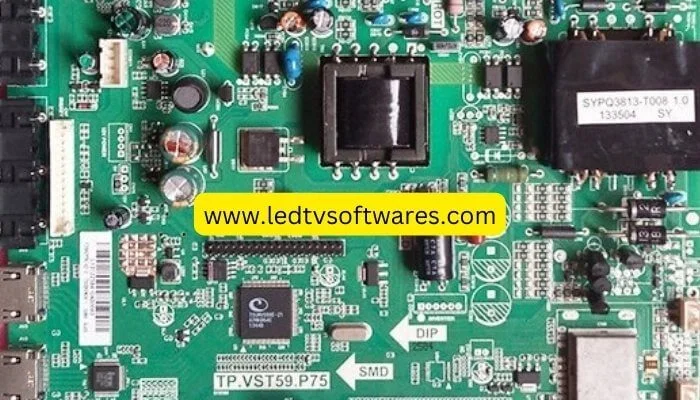
TP.VST59.P75 Firmware Download Free
TP.VST59.P75 is an analog LED TV. This board supports 32 to 50-inch screens up to a resolution of 1920×1080 support. with its USB interface, you can support software upgrades and multimedia playback as well. TP.VST59.P83 Here you can download the firmwar.
Basic Information PCB Board: TP.VST59.P75 Firmware Download Free
Model Number: TP.VST59.P75
Type: integrated circuit
Main CHIPSET: TSUMV5659XU/TSUMV59XE
Panel: LED TV
Interface: Single/Dual LVDS
Panel Max Resolution: 1920×1080
VIDEO INPUT: TV, PC-RGB, CVBS, HD MI
AUDIO INPUT: PC Audio, CVBS, Component
POWER To PANEL:12V
USB FUNCTION: Software upgrade, multimedia play
Button Types: Ground Key Interface
Best Panel Size: 32-50 inch
Backlight: +65 TO +85 V / 85 W
Speaker Output: 2x8W
Input Supply: 220V AC
You can find it here by clicking LEDTVSOFTWARES.COM TP.VST59.P75 Firmware Download That is a website. it is an All PCB Board Smart Android LED TVs HD-FHD Software & Firmware Upgrade All Resolution Code,1366X768, 1920X1080, USB Bin, China Remote, Samsung-LG-Sony-Panasonice- Haire & China Logo, etc, Factory Code, Service Code, Cof datasheet, T cone voltage, Panel Datasheet Service Manual, PDF Datasheet LED-LCD TVs, Dish Recver, Laptop Bois Bin, Download Free.
Service Code TP.VST59.P75 Firmware Download Free
The service code unlocks factory mode or the board’s internal parameters setting. These settings allow the technicians to control the parameters of the LED TV logo, brightness, contrasts, Resolution Code, Service Code, Cof datasheet, T cone voltage, Panel Datasheet, stuck Logo, android update, Hard Reset, circuit diagram pdf, Smart boot, Dump File, EMMC Pinout, Full HD-HD, Latest Firmware Download, Recovery file, Zip File, schematic, etc.
Through the remote, enter the numeric code. Menu + 1147
How to download and install TP.VST59.P75 Firmware Download Free
- Click on the Download Button below the table to download the required firmware.
- Put the firmware file on an empty USB drive. Ensure the USB has no other data on it.
- Downloaded files are stored in the download folder on your PC.
- Plug the USB into the USB port on the LED/ LCD Main Board.
- Wait until the LED IR or LCD/LED flashing stops after you turn on the LED TV power.
- LED IR stops flashing, remove the USB cable from the LCD/LED board.
- For this process to work, it must be completed quickly.
Note: Important TP.VST59.P75 Software Updating Firmware
LedTvSoftwares.com TP.VST59.P75 Firmware Download Free is not responsible for any loss or damage to the PCB board during the firmware. You can download TP.VST59.P75 Firmware Download and run firmware on your responsibility.
| 1 | TP.VST59.P75-1024X768-USB | Download |
| 2 | TP.VST59.P75-1024X768-6bit | Download |
| 3 | TP.VST59.P75-1600X900-USB | Download |
| 4 | TP.VST59.P75-1680X1050-USB | Download |
| 5 | TP.VST59.P75-1920X1080-MAP10-USB | Download |
| 6 | TP.VST59.P75-1920X1080-MA-USB | Download |
| 7 | TP.VST59.P75-1920X1080-USB | Download |
| 8 | TP.VST59.P75-1920X1080-USB-MIR | Download |
| 9 | TP.VST59.P75-1920X1200-Logo-USB | Download |
| 10 | TP.VST59.P75-1920X1200-USB | Download |
| 11 | TP.VST59.P75-P/N-DO6L-1024X768-USB | Download |
| 12 | TP.VST59.P75-P/N-AX080B077H-DO8L-1366X768 | Download |